Trading Router Affiliate Program
You can use our Affiliate Program to recommend our service and earn commissions.
After you register a Trading Router account, you will have a promo code. If anyone else register Trading Router account by using your promo code, you can get commissions when they pay their service.
You don't need to activate Trading Router service to use Trading Router for getting commissions. You only need to register a Trading Router account to get your promo code, then you can ask people to register Trading Router via your promo code and get your commissions. You don't need to use Traeding Router by yourself. As long as your recommended people use Trading Router, you will get commissions.
1. Benefit
If a user uses your promo code to register a Trading Router account, you will get commission for every dollar the user pays for Trading Router service. And the user will get once off credits of $10 after he pays more than $14.90 for Trading Router service.
Your initial commission rate is 10%, the rate will be increased when you recommend more and more users.
For example, you recommand user A to use Trading Router service. When user A pays $15 for Trading Router service, you will get commission 10% x $15 = $1.5. User A will also get once off credits of $10. Next time when user A pays another $15, you will get another commission of $1.5. When you recommend more users, we will increase your commission rate. For example if you recommend 5 users, and the 5 users make at least one payment, we will increase your commission rate to 15%.
2. Promo Code
2.1 Your own Promo Code
You can find your promo code in your account dashboard. It says "Your own promo code is ......"
Please note, when you user other people's promo code to register your own account, the other people's promod code will also show in your dashboard. So don't mistake the promo code you used with your own promo code.
In the following picture, the promo code MHENCY is other people's promo code you used. The promo code AIYLCX is your own promo code. When you recommend Trading Router service, you should provide your own promo code AIYLCX so that other people can register with your own promo code AIYLCX and you can get commissions.
The promo code is case sensitive.
Your own promo code is automatically generated by Trading Router. If you don't like it, you can customize any code you want, for example you can customize your own promo code as "GOOGLEPROMO". You have to Contact Us to customize your own promo code.

2.2 Use Promo Code
Other people can use your promo code in two ways. They can input your promo code in the registration form when they register a Trading Router account. They can use input the promo code in their Trading Router account dashboard within 30 days after they register the Trading Router account.
If other people choose to input your promo code in dashbaord after registering the account, they have to input your promo code within 30 days after their accounts are created.


2.3 Check Promo Code Applied
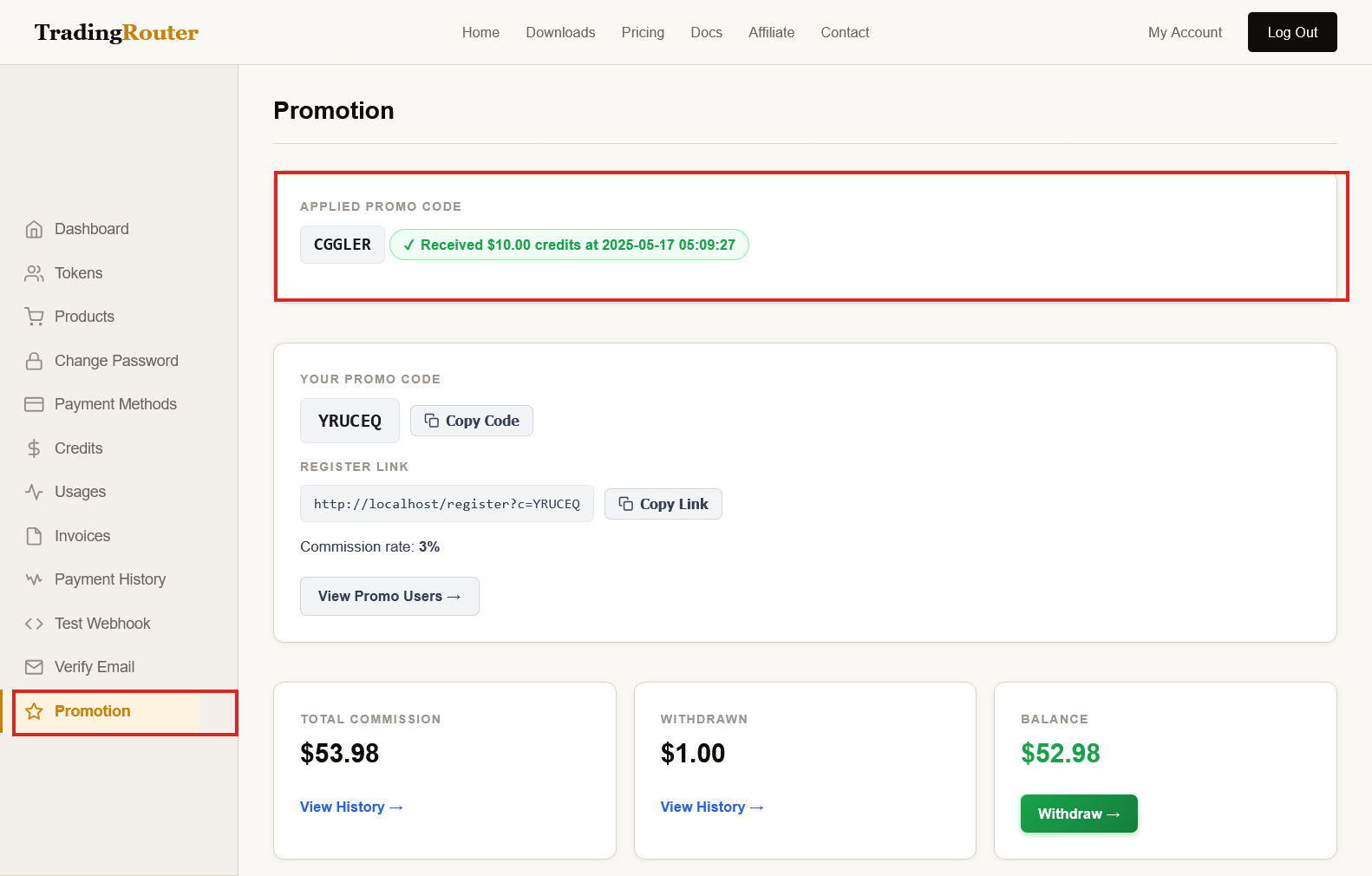
Other people can check if Promo Code is correctly applied by checking their dashbaord. They can go to promotion page in dashboard. If the it says "You are using the promo cdoe ...", it means they correctly applied your promo code.
3. Register Link
Other people can use your register link with promo code to register their Trading Router accounts, so that they don't need to manually input your promo code
3.1 Find Your Register Link with Promo Code
You can find your Register Link with your Promo Code in the promotion page of your dashboard

3.2 Use Register Link with Promo Code
Other people just need browse the link, the register form will be automatically filled with your own promo code.

4. Withdraw Commissoins
After you earn commissions, there are two ways to withdraw it. You can withdraw it as credits so that you can use th credits for your Trading Router service. You can also withdraw it as cash into your paypal account.
Please note, the minimum amount for withdraw as cash to paypal account is $50. There is no minimum amount requirement for widthdraw as credits.
You can click the Withdraw button on the promotion page to go to Request Withdraw Commission page.

4.1 Withdraw Commissions as Credits
On the Request Withdraw Commission page, select withdraw type as Credits, input the withdraw amount, then click Withdraw. Your commissions are then withdrawn as credits.

4.2 Withdraw Commissions as Cash
On the Request Withdraw Commission page, select withdraw type as Paypal, input paypal account, input the withdraw amount, then click Withdraw. Your commissions withdraw is submitted. We will transfer money into your paypal soon.
